Meetings that capture, think, coach, and follow through.
Sirano turns Google Meet into a live workspace, then carries the same thread into the web app for Ask, speaker cleanup, private notes, tags, and post-call execution.
Native capture
Lives inside Google Meet, not a second-window workaround.
Live AI
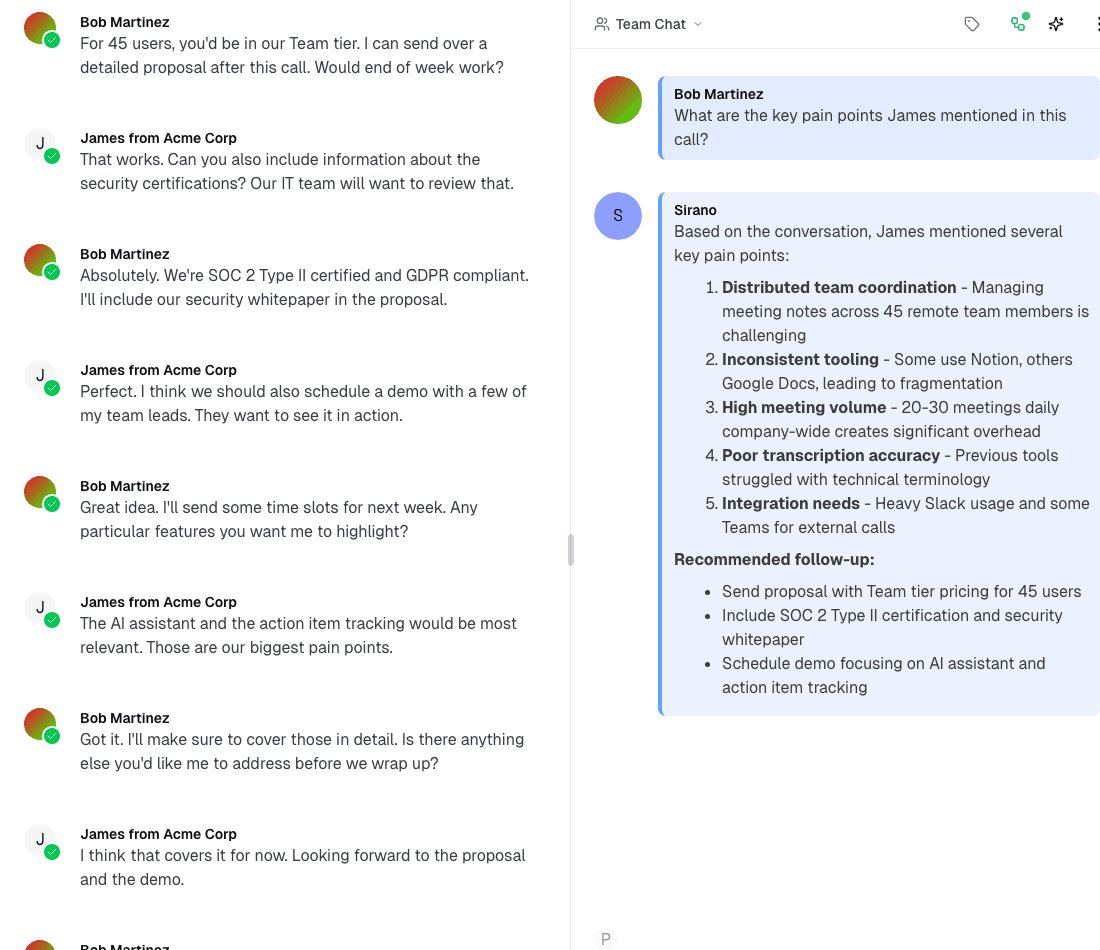
Coaching, Ask, web search, and context-aware follow-up in one thread.
Persistent workspace
The extension continues in the web app instead of ending at the transcript.
A simple start flow that does not force a context switch
The easiest version of the product is also the one the codebase actually supports: install the extension, sign in once, and start the session directly in Meet.
Install the extension
Add Sirano to Chrome and place it directly inside the Google Meet side panel.
Sign in once
Use the Sirano handoff flow to connect your account without leaving the meeting workflow.
Start Sirano Session
Begin recording to capture live transcripts, coaching, Ask, and a thread that persists after the call.
Use the meetings product in the mode that matches the moment
Sirano is not only a live recorder. It works as a native Meet extension, a persistent web workspace, and a migration path from earlier transcript systems.
Capture the meeting where the meeting is happening
Sirano lives inside the Meet sidebar, so you can start a session, watch the transcript fill, and use AI without breaking the room.
The meeting becomes a working surface, not a note dump
The real product is broader than transcript plus summary. Sirano keeps the live conversation, collaboration, Ask, private mode, speaker work, and post-call artifacts inside one workspace.
Live transcript + saved thread continuity
Transcript lines appear in real time and remain part of the persistent meeting workspace after the call.
Team chat + private mode
Collaborate openly with the team or switch into private notes without leaving the meeting thread.
Ask with context
Use Ask, web search, attachments, and replies against the meeting context instead of a blank chatbot.
Live coaching
Surface structured suggestions during the meeting, not only after the summary arrives.
Tags and artifacts
Organize threads with tags, export transcripts, and keep meeting outputs easy to find later.
Audio + playback
Recording output and transcript history stay connected to the same thread for review and follow-up.
Easy to start, resilient while the meeting is moving
The extension is designed to feel native in Meet and durable under real meeting behavior: closing panels, switching views, stale recorders, and connection changes.
Native in Google Meet
Sirano mounts into the Meet side panel instead of forcing a second app window during the call.
Panel close does not kill the session
Recording state lives in the background, so users can close and reopen the panel without losing continuity.
Recorder ownership is explicit
If someone else is recording, the UI reflects that. If they go stale, takeover is supported.
Connection state stays visible
Live, connecting, and degraded states are surfaced so teams know what the system is doing.
Reliability Story
Close the panel. Reopen it. The meeting keeps moving.
The strongest differentiation here is not generic note-taking copy. It is operational continuity: background-managed state, explicit recorder ownership, visible connection health, and a thread that survives real-world meeting behavior.
Recording can continue while the UI is out of sight.
Transcript and meeting state recover instead of resetting.
If the current recorder goes stale, takeover is supported.
Treat speaker identity as something the system can learn
Sirano goes beyond anonymous transcript labels by letting teams match, teach, and fix speaker identity in a way that improves the meeting record over time.
Turn "Speaker 2" into a real person once, then keep the thread clean.
Voice-signature-backed matching, inline suggestions, and bulk relabeling make speaker cleanup part of the working workflow instead of an afterthought.
Teachable speaker identity
Voice signatures let teams teach Sirano who is who instead of treating every speaker as disposable text.
Inline speaker suggestions
Transcript bubbles can surface likely matches and make manual speaker correction faster.
Bulk relabeling
Apply a speaker decision across the thread so cleanup work scales beyond one transcript line at a time.
From live conversation to real follow-through
The thread does not stop being useful when the meeting ends. Sirano keeps the context alive and can extend the meeting into Flow-linked execution when teams need it.
Set the room up
Open the meeting thread, bring in prior context, and start from the extension or the web app depending on the workflow.
Capture + think in real time
Run live transcript, Ask, coaching, tags, private notes, and speaker labeling while the conversation is still happening.
Turn conversation into follow-through
Keep working in the same thread with summaries, playback, actions, and Flow-linked meeting outputs.
Flow follow-through
An advanced layer for teams that need action, not only notes
When the meeting is linked into Flow, transcript deltas can drive working docs, reversible changesets, replayable observer output, and post-call artifacts. That is the point where Sirano becomes more than a meeting memory product.
Link meetings to accounts and call types
Flow can attach the thread to account context instead of leaving the call as an isolated note artifact.
Observer-driven working docs
Transcript deltas can power rolling summaries, action items, and working documents while the call is live.
Reversible changesets
Meeting-derived changes can be reviewed, undone, and reapplied instead of disappearing into a summary blob.
The thread keeps compounding instead of flattening into a summary.
A meeting workspace and action layer, not just a transcript destination
Otter clearly offers notes, summaries, AI chat, and a Chrome extension workflow. Sirano is stronger when the goal is to work inside the meeting, collaborate in one persistent thread, and carry the conversation directly into follow-through.
Where the product lives during the meeting
A native Google Meet panel plus a persistent Sirano thread that continues in the web app.
A Chrome extension with bot-free local recording for Google Meet, plus a standalone web app for Zoom and Teams.
Shared vs private collaboration
Team chat and private notes exist in the same meeting workspace, tied to the same thread.
Channels organize conversations by team or project, with collaborative note editing and tagging inside transcripts.
Live AI context and in-meeting actions
Ask, web search, attachments, replies, live coaching, and thread-aware context all work inside the meeting workflow.
AI Chat answers questions across meetings and connected apps, with automatic summaries and action item extraction.
Speaker intelligence
Org-trained voice signatures and bulk speaker labeling make speaker identity teachable over time.
Built-in speaker identification and recognition with manual transcript editing in the extension and web app.
From transcript to operational follow-through
Flow links meetings to working docs, reversible changesets, replay, and post-call outputs.
Integrates with Salesforce, HubSpot, Slack, Google Docs, Notion, Jira, and Asana for CRM sync and task handoff.
Migration path from existing notes/transcripts
Import Otter transcripts and continue inside the Sirano thread model without starting from scratch.
Meeting history lives inside Otter with export options but no direct import path into competing products.
The product stays simple even though the workflow goes deep
These are the practical questions most teams ask before they start using the meetings stack.
Use Sirano where the meeting happens, then keep the same thread moving afterward.
Start in Google Meet, continue in the web app, import older transcripts when needed, and let Flow take the hand-off when the meeting needs to become action.